In our digitally connected world, spending eight hours or more in front of a screen is not just common; for many professionals, it is a requirement. Whether you are coding, designing, analyzing data, or attending back-to-back video meetings, your eyes are the primary tools you use to get the job done. While technology has brought incredible efficiency to our work, it has also introduced a new kind of athletic challenge for our visual system. Just as a marathon runner needs to care for their legs, a digital professional must actively care for their eyes to maintain peak performance and comfort.
The good news is that digital eye strain is not an inevitable price of success. By understanding how your eyes function and implementing a few strategic habits, you can maintain visual clarity and comfort throughout your workday. This guide explores practical, expert-backed strategies to keep your vision sharp, ensuring that your eyes remain as resilient as your career ambitions.
Understanding the Digital Demand
When we look at a screen, our eyes are doing much more than just “seeing.” They are constantly focusing, converging (turning inward), and processing rapid-fire visual information. Unlike reading a printed page, digital screens are made of tiny pixels that are brightest at the center and softer at the edges. This requires our eyes to work harder to maintain a lock on the image, a micro-effort that adds up over thousands of seconds in a workday.
The Binocular Connection
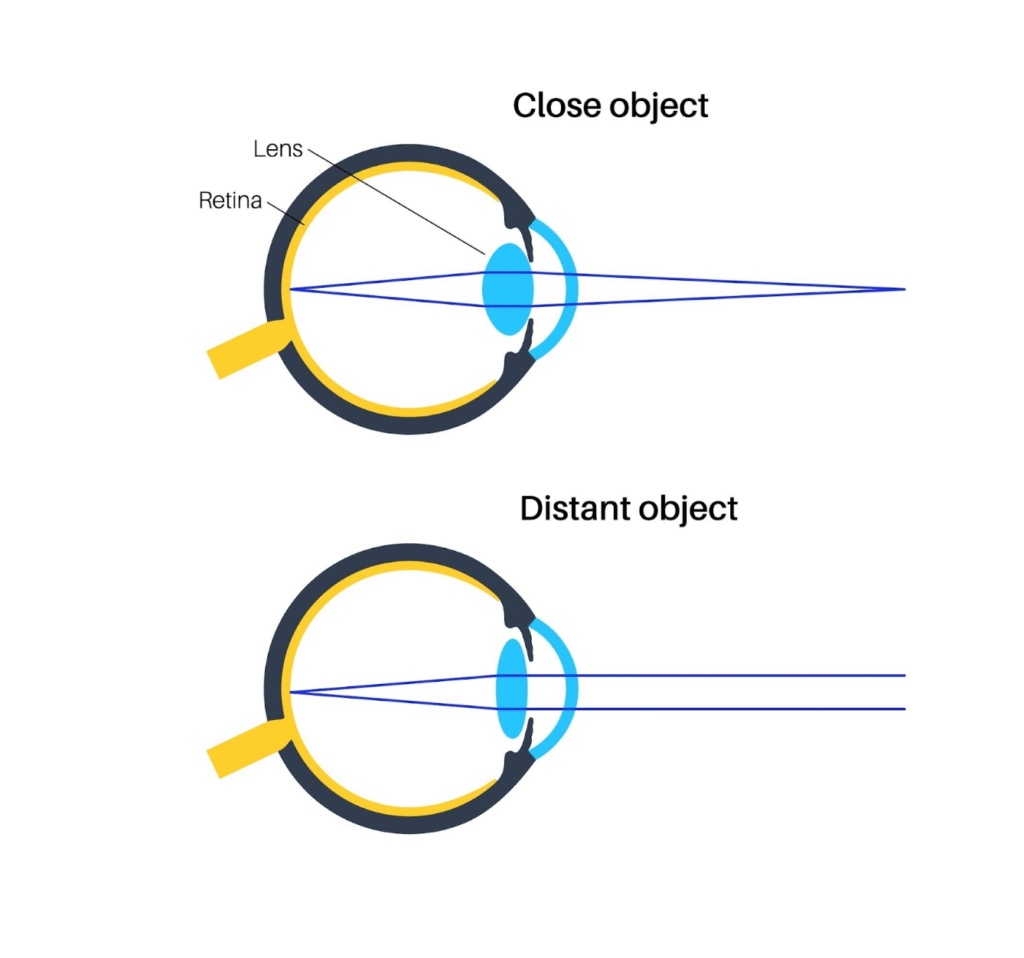
It is often the hidden effort of keeping both eyes perfectly aligned that causes the most fatigue.
Interestingly, the strain we feel often stems from our eyes struggling to maintain alignment for hours on end. Concepts derived from advanced lazy eye treatment have shown us that when eyes fail to cooperate efficiently, the visual system becomes overwhelmed, leading to the fatigue we know all too well. When the brain has to use excessive energy just to keep both eyes pointing at the exact same pixel, it leaves less energy for processing information, leading to that familiar feeling of “brain fog” by 3 PM.
This connection highlights why simply resting your eyes isn’t always enough. We need to think about how our eyes work together as a team. If one eye is doing more work than the other, or if they struggle to fuse images at a near distance, the result is discomfort. Understanding this binocular foundation is the first step toward true visual endurance.
Optimizing Your Digital Environment
Creating a vision-friendly workspace is one of the most effective ways to support your eye health. Small adjustments to your physical environment can yield significant dividends in comfort.
- The High-Five Rule: Your monitor should be roughly an arm’s length away from your face. If you can high-five your screen, you are too close.
- Gaze Downward: Position the top of your screen at or slightly below eye level. This encourages your eyelids to lower slightly, reducing the exposed surface area of the eye and minimizing moisture evaporation.
- Lighting Matters: Ensure the room lighting is balanced with your screen brightness. Working in a dark room with a bright screen creates a “spotlight effect” that forces your eyes to constantly adapt, which can be tiring.
The Power of the 20-20-20 Rule
The ciliary muscles in your eyes, which control focus, are similar to any other muscle in your body: holding a contracted position for hours leads to stiffness. The 20-20-20 rule is the gold standard for breaking this tension.
Every 20 minutes, take 20 seconds to look at something 20 feet away. This simple action allows the focusing muscles to fully relax and reset. It is a brief “stretch break” for your vision. While it sounds simple, consistency is key. Many professionals find that using a timer or an app reminder helps turn this into a subconscious habit.
Beyond Rest: Active Visual Recovery
While breaks are essential, active strengthening can also play a role in resilience. Just as athletes train to prevent injury, you can train your eyes to withstand digital demands.
One effective technique is “pencil push-ups,” a convergence exercise. Hold a pencil at arm’s length and slowly bring it closer to your nose while keeping the tip single and focused. This trains the eyes to move inward smoothly and accurately. This type of training is similar to the binocular exercises used in lazy eye treatment protocols, where the goal is to robustly strengthen the coordination between the brain and both eyes. By enhancing this coordination, you reduce the effort required to focus on your screen, making your 8-hour shift feel significantly less taxing.
Another helpful practice is conscious blinking. We tend to blink nearly 66% less when staring at a screen. Making a conscious effort to close your eyes fully and gently every few minutes refreshes the tear film, which is the eye’s first layer of optical clarity.
Blue Light and Digital Hygiene
The topic of blue light often comes up in discussions about screen time. While blue light itself is natural (the sun is our biggest source), the proximity and duration of screen exposure can affect our circadian rhythms and visual comfort.
Using “Night Mode” or “Eye Comfort Shield” settings on your devices is a great first step. These settings warm the color temperature of your screen, reducing the amount of high-energy blue light emitted. For those who want an extra layer of protection, high-quality computer glasses with anti-reflective coating can reduce glare and improve contrast, making it easier for your eyes to interpret the text on the screen.
Prioritizing Professional Care
Perhaps the most important step in protecting your vision is regular comprehensive eye exams. A standard vision screening that checks if you can read the 20/20 line is a good start, but for heavy screen users, it is often not enough.
You need an exam that evaluates how your eyes function at near distances. Ask your eye care professional to check your binocular vision status. They can identify subtle misalignments or focusing lags that might be contributing to your daily fatigue. Early detection of these minor functional issues allows for proactive management, ensuring they don’t develop into larger obstacles later in your career.
Conclusion
Working in a digital environment offers immense opportunities, and with the right approach, your eyes can thrive alongside your career. By combining ergonomic wisdom, regular breaks, active strengthening, and professional care, you can build a visual system that is robust and resilient. Remember, your vision is a precious asset that deserves the same level of investment and care as the work you produce. With these positive habits in place, you can look forward to years of clear, comfortable, and productive screen time.
Frequently Asked Questions (FAQs)
Q: Do blue light glasses really work?
A: Many users report that blue light glasses help reduce eye strain and improve sleep quality by filtering out high-energy blue light. While research is ongoing, they can be a helpful tool for increasing visual comfort, especially during evening work sessions.
Q: Why do my eyes feel dry after using the computer?
A: When focusing intently on a screen, your blink rate drops significantly—often by more than half. This causes the tears on the surface of your eye to evaporate faster than they are replenished, leading to dryness and irritation.
Q: Can I use eye drops daily?
A: Preservative-free artificial tears are generally safe to use daily to help maintain moisture. However, it is always best to consult with your eye doctor to choose the right type of drops for your specific needs, especially if you experience chronic dryness.
Q: Is dark mode better for my eyes?
A: Dark mode can reduce glare and overall brightness, which is often more comfortable in low-light environments. However, for some people with astigmatism, reading white text on a black background can cause “halation” (a halo effect), so it is best to use whichever mode feels most comfortable for you.
Q: How often should I get an eye exam if I work on computers?
A: Most experts recommend a comprehensive eye exam every one to two years. However, if you are experiencing frequent headaches, blurred vision, or eye fatigue, you should schedule a visit sooner to rule out any underlying issues.